If you want to receive a cronjob error or notification, you can update your e-mail address from the cPanel's Cronjob Page.
1. Log into your cPanel account.
2. In the "Advanced" section, click on "Cron Jobs" Icon.

3. Under "Cron Email" you should enter your full e-mail address in text field.
4. Click on the "Update Email" Button.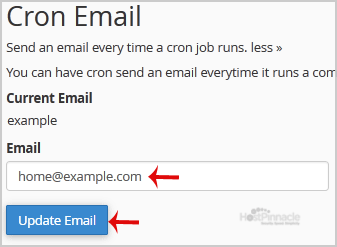
- Home
-
Store
- Browse All
- Shared Hosting
- Odoo Websites
- Storage
- Servers
- ISP Billing Systems
- ITAX Services
- Chatwoot CRM
- Corporate Services
- ADsense & Analytics
- CIVICRM -NGO ERP
- Dolibarr ERP
- PAID DOWNLOADS
- Website Builder
- Website Security
- Website Backup
- SSL Certificates
- Professional Email
- Site Builder
- Register a New Domain
- Transfer Domains to Us
- Announcements
- Knowledgebase
- Network Status
- Affiliates
- Contact Us
-
More